| |||||||||||||||||||||||||||||
| |||||||||||||||||||||||||||||
|
20 May 2015
New Library Premises AND New Library Web environment


24 October 2014
What the alumni can do for the library -- and for themselves
It has been nearly two years since the Maritime Librarian posted a blog on “What the library can do for WMU Alumni.” The answer at the time, basically, was not that much. The answer now is not much more. We will not recount the reasons for this, as they are the same as they were two years ago.
The experiences gained since then convince us that What the Alumni Can do for the Library is a better place to start. We can achieve next to nothing if WMU graduates expect to be passive recipients of the bounty of maritime information they enjoyed as students. Given the issues of copyright fees, contractual authorizations, and IT infrastructure that must be addressed to provide this growing and global community of users with remote online access to maritime information, the WMU alumni need to be actively assisting in the creation of their own library services. To paraphrase the famous line from the movie Jerry McGuire, we need you to “help us help you”
The help we need is in three three forms. Most obviously, we need money. Databases such as Ebrary and i-Law charge the library by headcount. If the headcount goes up beyond the number of current students and faculty, we can expect to be charged more. However, as in any other business, purchasing in bigger bulk usually translates to a lower cost per unit, i.e., a lower cost per user. As this information is not free for the library, it can not be made free for alumni, but if members were willing to pay a fee, at cost, access would at least be cheaper than what individual members would have to pay on their own.
This brings me to the second form of assistance, participation in a consortium of maritime libraries. Those of you who are returning to work in maritime colleges more than likely already have a library. If a global network of such libraries were to join in a formal association of libraries, we can bargain collectively for even greater cost reductions. If you are a member of such an institution, you can access whatever your library has rights to, including what we will have collectively purchased. If you do not work at an educational institution, you might be able to convince your organization to set up an office "library." This would require complying with a few formalities, and designating at least one person in the office to perform part´time duties as "librarian," but an office in your organization meeting the minimum qualifications of a library could be granted consortium membership with the rights and privileges pertaining thereto.
A library consortium would not only have the advantage of leveraging better prices in collective purchasing, but would allow for expedited interlibrary loans and the scanning of articles, chapters and documents via a digital delivery system among participating "libraries." We could also share discovery services, aggregating our joint holdings into one catalog, on one server, having only one point of maintenance, and allowing patrons at one organization to search the collections of all and to request items that are not available on the local library shelves to be delivered or scanned from another participating library.
A further benefit is sharing the burden of cataloging. The description of books and articles, the assignment of proper author and subject headings, is time consuming work for libraries, but a consortium has the benefit of needing only one catalog record that can be used by all organizations. Consortial cataloging multiplies the number of titles that could be cataloged for the whole group. This would allow, for instance, one library to catalog the individual articles in an issue of Fairplay, while another library catalogs the articles in American Shipper. Neither of these journals are currently cataloged at the article level, which means if a patron does not already know the issue that a given article was published in, he or she will not be able to search for it in anyone's catalog. Cooperative cataloging is one means of addressing this shortfall in maritime research.
The phenomenon of cooperative data entry, sometimes called crowdsourcing, is the third form of assistance that alumni could contribute. It has applications extending far beyond what specialist in library cataloging would be expected to undertake, and has the potential to significantly reduce the cost of maritime information.
What sort of costs are we talking about? Last year, the library paid £1200 for the Drewry Manning Report. Drewry was considerate enough to let us share the PDF in-house among faculty and students, and the report is 90 pages full of good information routinely needed for MSc studies and faculty research. But is it really worth twelve hundred British Pounds? It features nice editorial summaries and graphs, but do such enhancements justify the £13 per page that Drewry is asking? I would rather have access to the raw columns and rows and come to my own conclusions and make my own graphs, if it means I can get the information more cheaply.
The same goes for the Casualty Statistics we purchase annually from IHS -- €750 for a year's worth of summary data in a spreadsheet. We are of course paying for the work required to collect this information and apply the spreadsheet functions needed to break this information down by collision type, vessel type, location of accident, flag, etc., but with the raw data we could make these calculations for ourselves as well as a great deal more of our own devising.
We buy a four volume port guide accompanied by a CD-ROM disc every other year because we can't afford to buy it annually. Fortunately, the contact, approach and capacity information don't change much from year to year, but unlike with the online database version, it only takes one change in one port to render these volumes, and the CD, technically out of date. Unfortunately, the online version costs even more than the print version, despite the publisher not having to bear the cost for printing, binding, warehousing or transportation.
And where does the data for these publications come from but you, the professionals in the maritime sector? The big name publishers send you questionnaires that you dutifully fill out and return, and after all the forms have been collated, analyzed and summarized, they offer to sell you their results. Think on this: Your own data is being sold back to you at the highest price that the market will bear. This is the very definition of Information Colonialism, and like all forms of colonialism, the primary beneficiaries are the colonists who own the finished product and not the native population that does the heavy work of collecting the raw materials.
And this is where the alumni can help with crowdsourcing. While maritime librarians can apply their special skills in describing and categorizing content for online retrieval, the maritime practitioner can provide the raw data to be stored in online databases and made available for querying by anyone with the interest and an internet connection. There are still costs involved, but with the middlemen cut out of the process, they are not nearly as great. Imagine generating up-to-date, comprehensive statistics on a web site sustained by online advertising, or by a small membership fee, or by modest contributions from organizational sponsors with an interest in the public good. Individually, none of you have the complete information to make such databases, but collectively, as a crowd, you are tapped into a network of maritime information with the potential to strike a serious blow at the publishing overlords and their beyond-the-pale pricing.
As I hope to have made clear by these illustrations, a purposeful and cohesive alumni association is critical to the success of extending access to the maritime information many of you want the WMU library to provide. For monographic books and journal articles, there is the simple reality of having to pay for the extra readership. A consortium of libraries --libraries that can be established within organizations even if they are not academic organizations-- can assist in collective bargaining with publishers and information aggregators, and alumni will need to help establish and connect these libraries to our maritime information network. And finally, the very information generated by your place of business has value that should not just be handed over to traditional publishing houses. As alumni belonging to a global network of maritime professionals, you are in a unique position to spot opportunities and manage crowdsourcing projects. The library can host the data and make it available at the lowest possible cost, which ultimately translates into our ability to offer more services to alumni.
A nice symbiosis. The library looks forward to working with the alumni, but further progress requires an alumni association to do its part.
In other words, help us help you.
03 October 2014
New Video Training Series at the library
The World Maritime University Library is pleased to announce its acquisition of 22 new maritime training videos in DVD format from the Walport TrainingLink series produced by the VKH Media Group.

Topics include ship security and safety, seafarer's rights under the Maritime Labour Convention, marine pollution, energy conservation, and getting along in the multicultural environment of life aboard ship. WMU students and faculty are welcome to check out the following DVD titles:
Topics include ship security and safety, seafarer's rights under the Maritime Labour Convention, marine pollution, energy conservation, and getting along in the multicultural environment of life aboard ship. WMU students and faculty are welcome to check out the following DVD titles:
- A seafarer's guide to energy conservation and the marine environment
- Cooling conflict
- Crowd management : can you do it?
- From plan to action
- Maritime labor convention : know your rights
- MARPOL : the new rules
- Navigating oceans and cultures
- Pollution response : prepare & prevent
- Security now! : guidebook
- Security search techniques : accommodation
- Security search techniques : personnel
- Security search techniques : baggage
- Security search techniques : ship's stores
- Ship security officer : duties and responsibilities
- STCW compliance : 2010 Manila Amendments
- Stowaways! : a new view on prevention
- The Assessment
- The human element : a film about the role of human behavior in safety at sea
- The ISM code : what's it got to do with me?
- The on-scene survey
- The security plan
- Through troubled waters
We hope that library patrons will find these videos useful. And, as always, we welcome your comments and suggestions.
Special thanks to Professor Dalaklis for alerting us to this collection.
~
29 June 2014
Ebsco Discovery Service Trial at WMU Library
The dearth of recent postings on this blog in no way reflect a lack of energy and effort on the part of library staff to bring more quality information resources and services to WMU library patrons. In fact, after several months of negotiations and background work, the staff is pleased to announce a two month trial for a host of new electronic content as well as a unified interface for searching across many of the library's subscription databases, ebooks and journal titles.
Until 1 September, WMU users will be able to access Ebsco's eBook Academic Collection and Academic Search Premiere article database. In terms of price, coverage, and user reading experience, these two fulltext platforms compete very well with the library's current Ebrary and ProQuest subscriptions. Additionally, we have trial access to Fish, fisheries & Aquatic Biodiversity Worldwide; Waters & Oceans Worldwide and Environment Complete -- databases consisting
of commercial, government and NGO reports and studies aggregated and searchable in a single resource.
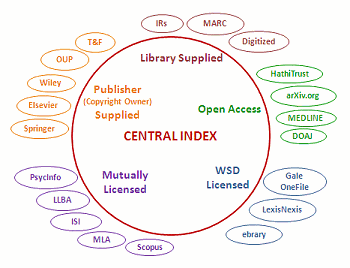 |
| From Infotoday.com |
The second service, the URL Resolver, is a massive database of citations with links directly to the full-text offered by all the major providers of that content. If the library subscribes to a journal through Ingenta, for example, but that journal is also available through ScienceDirect, library users will be directed to the full-text on Ingenta. More interestingly, if ScienceDirect provides the library with the last three years of an e-journal, but Ingenta provides back issues beyond that, the resolver will link the user to the right resource based on the year the article was published. To function properly, library staff have to register and maintain their e-journal subscriptions and ebook purchases with the Resolver service, but with the growing number of electronic texts being added to our collections almost daily, it is well worth the effort.
The use of a unified search interface like EDS would not be nearly as effective without the resolver service. For discovery purposes, users have the option of searching a much larger universe of content than that owned or leased by the library, but because the Resolver contains library subscription information, users can also limit results to "Available in the library collections." For example, using the latter option, instead of retrieving citations from all of Taylor & Francis' e-journals, they would only get results from Maritime Policy & Management and the handful of other titles that the library subscribes to through T&F. Likewise, search results could be retrieved from all the content of ScienceDirect -- with links to purchase requests for articles not owned by the library -- or just from the hundred or so individual articles that the library has already purchased and is permitted to store in its local repository.
Not that the library is ready to provide this level of convenience. What the Ebsco Discovery Service and OpenURL Resolver offer at present are the materials and tools to build an information retrieval system unique to the needs of WMU and the community of maritime researchers. They offer a great step forward in allowing the library to include databases, or portions of databases, or single e-journal titles, as well as local digital repositories, all within a single search.
Moreover, against any of these aggregations of content it is possible to set hidden search limiters and expanders in order to achieve more relevant results without sacrificing too much comprehensiveness, and vice-versa. For instance, with limiting descriptors, a search for "port state control" would not retrieve articles on computer motherboards, and searching for piracy would not entail scrolling through pages of citations about illegal downloads and copyright violations. By contrast, with expanding descriptors, content about maritime law could be retrieved in a search for "Admiralty Law" even when the retrieved content does not actually include the latter term. In this way, a whole system of cross-references and guides can be developed over time to glean meaningful maritime content from the wash of online information.
Moreover, against any of these aggregations of content it is possible to set hidden search limiters and expanders in order to achieve more relevant results without sacrificing too much comprehensiveness, and vice-versa. For instance, with limiting descriptors, a search for "port state control" would not retrieve articles on computer motherboards, and searching for piracy would not entail scrolling through pages of citations about illegal downloads and copyright violations. By contrast, with expanding descriptors, content about maritime law could be retrieved in a search for "Admiralty Law" even when the retrieved content does not actually include the latter term. In this way, a whole system of cross-references and guides can be developed over time to glean meaningful maritime content from the wash of online information.
EDS can be configured for different user groups, not only the branding, but the databases to be searched and the default settings to be applied in search and retrieval. This might possibly allow customization for MSc specializations or the university's research groups. EDS also has an Application Programming Interface (API) that allows customer institutions to build interfaces and functionality on top of the EDS retrieval system. One very interesting application already developed and shared with the EDS "user community" integrates the Ebsco discovery service with the Moodle Learning Management System, allowing instructors or their designees to search for full-text content from within the LMS and to provide e-content links straight from their course reading pages.
 Now, however, we have the bricks and mortar, the lumber and nails, and a simple blueprint to begin the work. During the trial EDS will not search the library's catalogue of local holdings, but while we are working on that, we have provided a library Start Page that will make toggling between the two systems more manageable. The EDS will also not search the Clarkson's databases, given that Clarkson's is used for generating data tables rather than for retrieving full text documents. Nor will EDS integrate with titles published by Informa Lloyd's or IHS Fairplay, as neither of these two information empires have come to appreciate the wisdom or profitability in providing bibliographic aggregators like Ebsco and ProQuest with the metadata that drives online discovery. Nevertheless, to the extent possible we will provide links and references to these resources.
Rather than waiting to roll out a finished product, the library is releasing the service as developed until now, with plans to make frequent, iterative, improvements. In fact, given the overwhelming configuration options, it would be arrogant to imagine ourselves competent to determine all the possible uses and customizations to which the discovery service can be put without hearing ideas from our patrons. We are therefore asking our users to get involved at the earliest stages, and to stay involved. Taking into account your suggestions and criticism, as well as features and fixes we already have in mind, we hope to make enhancements on a weekly basis. And, should we decide to license the EDS after the trial period, we plan to continue developing it and linking new content and services in accordance with the evolving research needs of our patrons.
This is but the first invitation. We plan to make this offer door-to-door if that is what it takes to get your participation. The reward for participating is access to more maritime scholarship, discoverable through a single search box.
Check it out for yourself.
15 November 2013
NEW TO WMU: Clarkson's World Fleet Register

This database allows users to query and get "tabular data" on vessels by flag, owners, builders, class and nationality, with breakdowns by ship type and vessel characteristics, including GT, Dwt, Draught, Speed, Beam, fuel type and more. WFR additionally provides orderbook details on more than 8,000 ships from over 600 shipyards worldwide. As with SIN, the database has a sophisticated "Time Series" report generator as well as chart making functionality for pulling together and displaying unique cross sections of information from more than 90,000 vessels. Search results can also be downloaded in spreadsheet format.
As it does with the Shipping Intelligence Network, Clarkson's provides its own regular reports for The World Fleet Register. These can be downloaded and saved as PDFs.
User access to WFR is based on being within the WMU IP range AND having the user name and password for the WMU account. WMU staff and students who are not on campus will be prompted to log in with their WMU email accounts, which will then give them "proxy" access as if they were in the WMU domain.
However, the access process is a bit weird after that. Clarkson's gives WMU site-licensed access for the price of a single private user (otherwise we simply could not afford it), but that single user is yours truly, the WMU librarian. Therefore, it is my email address that is required as the user name on the WFR login form. And you will need the password from the library as well. We are not worried about the user name and password being passed out, because IP or proxy access is required anyway.
When downloading reports, a pop-up box appears stating that this account belongs to Chris Hoebeke and you are asked to confirm that you are -- well, me. Go ahead and lie and click "Accept." You aren't actually violating our terms of access; this is just a quirk of our arrangement with Clarkson's and the defaults of their authentication system.
As with the case of SIN, this database is for ACADEMIC RESEARCH PURPOSES ONLY. Using it for commercial purposes will jeopardize WMU's special access rights.
Anyway, we encourage students and staff to give it a try. Ask the library for the password, use it with my email address, and agree to store the password in your browser for next time.
Let us know what you think.
24 October 2013
Introducing laptop checkout at WMU
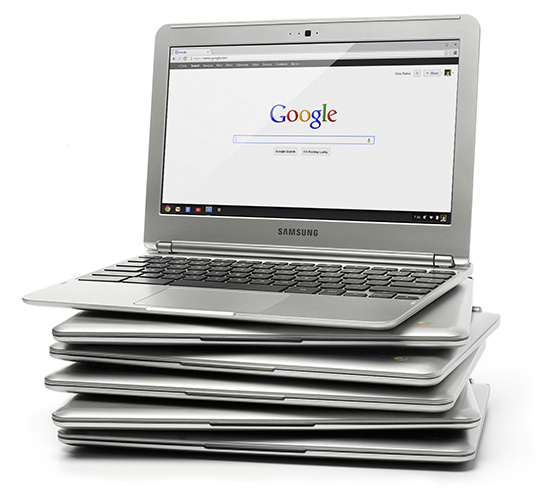
This week, WMU library inaugurated a new service: Laptop checkout. Using low-cost, low-maintenance "Chromebooks" produced by Samsung, the library acquired 5 lightweight, highly portable computers that students, visiting professors, or even walk-in researchers can borrow for use in the library.
The Chromebooks are something of a revolution in computing the last couple years. Based on the internet-centric "Chrome OS," with small hard drives (16GB) and no installable desktop apps like Microsoft Word or Excel, the Chromebook certainly does not fit every laptop use case, but for the library they are a near perfect fit.
Retailing at 249 US dollars made them affordable enough to get a small fleet of them. All the set up and administration is performed remotely through the university's Google Apps admin site. Each computer is enrolled in a group, and changing the settings for the group automatically changes the settings for all Chromebooks in the group. Settings include permissible sites (whitelist), forbidden sites (blacklist), the browser homepage, and what apps and web sites are automatically opened at startup. Google also updates the operating system incrementally in the background, so bugfixes and enhancements are automatic. No need to take a device out of service to install patches and upgrades. The operating system is always up to date.
This not only cuts down on the time library staff have to spend on laptop maintenance, but it allows for highly configurable user sessions that can be set on the basis of who the user is (professor, student, guest, etc.) or what department the Chromebook is registered with. Administrators may allow a guest session, for example, so that walk in patrons can just start browsing the web, or they can set sessions based on the user's Google Apps id. When a WMU user logs in to one of the library Chromebooks, the library catalog and databases pages are ready to be used. One click of the envelope icon at the bottom of the screen, and the user's email opens in another tab. The same for Calendar, Drive, Google Plus, Contacts, and the other Google Apps. Because the session is tied to the WMU id, third party services that authenticate through the Google Oauth service, such as Ebrary, WMU's New Academic site, and the library's beta discovery tool, The Beacon, all can be directly accessed just by logging into the Chromebook. The session will even include the user's bookmarks and extensions that were already installed in a Chrome browser on another computer.
Once the user ends the session, no trace is left on the local computer. No data is stored locally. Another user can log into the same Chromebook with a completely different custom session, while the previous user can log into Google Apps from any computer in the world, and take up wherever he or she left off in the Chromebook. Although they are equipped with two USB ports (as well as SD card slot, HDMI output, audio jack, built-in microphone and camera), there's no need to download files to USB sticks, since they can just be stored in Google Drive and accessed anytime later from a web browser.

The library's Chromebook fleet joins the catalog computer, the machine at the stand up workstation next to the entrance used for looking up the locations of materials in the library's physical inventory. That computers is a Chromebox -- pretty much the same system, except that it requires an external mouse, keyboard and monitor. Unlike its laptop counterparts, the box has been set up in "Kiosk" mode. Logging in is not required to start a session, but the anonymous session is customized to bring up the library catalog and home page. The idea is to reserve this workstation for quick lookups of call numbers. For more involved research, users can avail themselves of a Chromebook.
 In either type of device, the operating system (OS) is the same, Chrome OS. Basically, the Chrome operating system is the Google Chrome browser. It has been criticized for its lack of support for power "productivity tools," its small hard drive and its inability to do much without an internet connection. Certainly, this is a valid objection to those who need processor- and memory-intensive applications for video editing, but the "Apps" that are available for online use are growing in number and the range of their power and functionality. The library staff manipulate images of scanned book covers, for instance, using Pixlr editor, without downloading the file or leaving the Chrome browser. And while Google Spreadsheets don't have all the bells and whistles of Microsoft Excel, it probably has more than enough to get most jobs done. Google Presentations compare well with PowerPoint, with the added advantage that presentations are stored in the cloud and available from any web browser, as well as the fact that they can be shared with collaborators rather than having to be sent out in separate attachments and (sent back as attachments that have to be collated). And any App the user has installed in the Chrome browser on his or her personal computer is available on any other machine with a Chrome browser, including the library Chromebook.
But the arguments for the Chrome OS in the educational environment can wait for another post. The critical point for WMU researchers is that the library offers almost all of its collections and services through the web (even items in the print collection are discovered via the web-based catalog). And now it is offering lightweight laptops configured for easier access to those collections and services, with easy storing and sharing of information, single sign on to multiple services, and worry-free security.
So if you happen to have a couple of hours on campus to spare, come on by the library and check one out. Literally.

But the arguments for the Chrome OS in the educational environment can wait for another post. The critical point for WMU researchers is that the library offers almost all of its collections and services through the web (even items in the print collection are discovered via the web-based catalog). And now it is offering lightweight laptops configured for easier access to those collections and services, with easy storing and sharing of information, single sign on to multiple services, and worry-free security.
So if you happen to have a couple of hours on campus to spare, come on by the library and check one out. Literally.
04 March 2013
The taxonomy of maritime information

I was recently cataloging a work on port state control, for which there is no term in the Library of Congress' list of Subject Headings, so I looked up the book in the Library of Congress catalogue to see how it was categorized in their system. To provide access by the subject matter, the LOC catalog record applied the following five headings:
- Harbors--Safety regulations.
- Ships--Safety regulations.
- Ships--Inspection.
- Jurisdiction over ships at sea.
- Law of the sea.
- While all of these subject terms are relevant, none of them are on target, nor do they accurately hit the mark even when taken collectively. A good cross-referencing system would of course direct researchers to these broader, narrower and related terms, but students of maritime affairs researching such a topic would consistently, if not unanimously, start their search with the term "Port state control." LCSH does not even have a SEE or USE reference from this term, so searching or browsing by subject terminology in this instance is for all intents and purposes a useless endeavor.
I would answer that question with another: What if the document being searched nowhere uses the term that the user is searching for, but the content itself is exactly what the user is looking for? What if, for example, an author wrote an essay using the terms "ocean pollution," "pollution of the sea," "oil spill in the Gulf of Mexico," and even made a reference to "MARPOL," but never once employed the term "marine pollution," which happened to be the term that the online researcher was using to find material on this subject?
Or consider the opposite problem, when the user searches for a term widely accepted as authoritative in his profession or field of study, but the same term is also used extensively in an entirely different context. Searching the web for documents on "piracy," for example, can be as frustrating for the user researching acts of kidnapping and robbery at sea as for the user researching violations of copyright.
Such problems are common enough when searching full-text documents. In the case of most library catalogues, where the printed text of the book is on the shelf and only a brief description of it is available for online searching, the odds of users missing out on relevant materials or having to wade extensively through irrelevant materials would be at least as great.
The librarian attempts to provide the researcher with greater "recall" (comprehensiveness of results), without sacrificing "precision" (relevance of results), by means of a "controlled vocabulary." The idea is that a single term is selected to represent a concept, regardless of whether that term is used in the document itself, and all documents using variations of the term, variations of spelling, synonyms, etc., are assigned to that term. To aid users, those variations and synonyms are often given entries in the database which point the user to the "authoritative" term.
Controlled vocabulary is likewise used to distinguish between homographs (identically spelled words with different meanings), or to distinguish between two or more concepts that use the same words (a process known as "disambiguation"), usually by appending a clarifying word or phrase. For instance, Library of Congress Subject Headings distinguishes the concept of "Piracy" on the high seas from "Piracy (Copyright)."
The cataloger or indexer is guided in the selection of controlled vocabulary by means of a thesaurus. The thesaurus can also be used within the online search system itself to provide cross references that direct users from synonymous terms to the proper "heading" or to indicate distinction of concepts. The more comprehensive thesauri also will point users (and catalogers assigning subjects) to broader, narrower and related terms.
Needless to say, maintaining a thesaurus is a great deal of work. Library of Congress has been maintaining LCSH since 1898, and its list of established headings now numbers in the millions. For general works, and many specializations, there is probably no better thesaurus, but as noted at the outset of this article, its vocabulary is limited and imprecise in many areas having to do with maritime research.
While the WMU library is not staffed to build and maintain a thesaurus of maritime terminology from scratch, it is looking into existing work that could be used as a supplement to LCSH. The Transportation Research Board of the National Academies maintains the Transportation Research Thesaurus, or TRT, which obviously bears looking into. Also, Professor William Tetley's Glossary of Maritime Law Terms is hosted on the McGill University web site. The glossary is in its second edition, and provides excellent cross references. Unfortunately, it does not appear to have been updated since June of 2011.
But it does include the term "Port state control."
Subscribe to:
Posts (Atom)