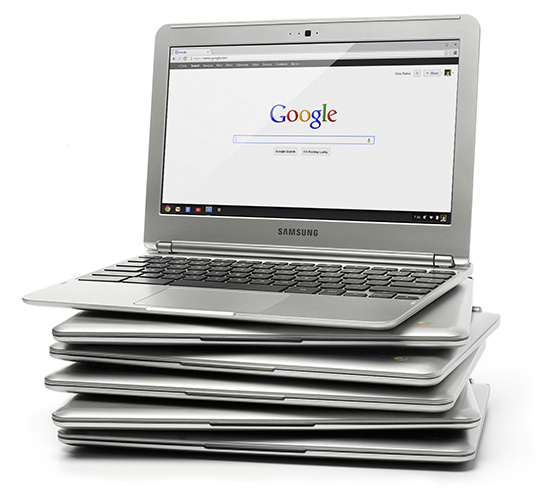
This week, WMU library inaugurated a new service: Laptop checkout. Using low-cost, low-maintenance "Chromebooks" produced by Samsung, the library acquired 5 lightweight, highly portable computers that students, visiting professors, or even walk-in researchers can borrow for use in the library.
The Chromebooks are something of a revolution in computing the last couple years. Based on the internet-centric "Chrome OS," with small hard drives (16GB) and no installable desktop apps like Microsoft Word or Excel, the Chromebook certainly does not fit every laptop use case, but for the library they are a near perfect fit.
Retailing at 249 US dollars made them affordable enough to get a small fleet of them. All the set up and administration is performed remotely through the university's Google Apps admin site. Each computer is enrolled in a group, and changing the settings for the group automatically changes the settings for all Chromebooks in the group. Settings include permissible sites (whitelist), forbidden sites (blacklist), the browser homepage, and what apps and web sites are automatically opened at startup. Google also updates the operating system incrementally in the background, so bugfixes and enhancements are automatic. No need to take a device out of service to install patches and upgrades. The operating system is always up to date.
This not only cuts down on the time library staff have to spend on laptop maintenance, but it allows for highly configurable user sessions that can be set on the basis of who the user is (professor, student, guest, etc.) or what department the Chromebook is registered with. Administrators may allow a guest session, for example, so that walk in patrons can just start browsing the web, or they can set sessions based on the user's Google Apps id. When a WMU user logs in to one of the library Chromebooks, the library catalog and databases pages are ready to be used. One click of the envelope icon at the bottom of the screen, and the user's email opens in another tab. The same for Calendar, Drive, Google Plus, Contacts, and the other Google Apps. Because the session is tied to the WMU id, third party services that authenticate through the Google Oauth service, such as Ebrary, WMU's New Academic site, and the library's beta discovery tool, The Beacon, all can be directly accessed just by logging into the Chromebook. The session will even include the user's bookmarks and extensions that were already installed in a Chrome browser on another computer.
Once the user ends the session, no trace is left on the local computer. No data is stored locally. Another user can log into the same Chromebook with a completely different custom session, while the previous user can log into Google Apps from any computer in the world, and take up wherever he or she left off in the Chromebook. Although they are equipped with two USB ports (as well as SD card slot, HDMI output, audio jack, built-in microphone and camera), there's no need to download files to USB sticks, since they can just be stored in Google Drive and accessed anytime later from a web browser.

The library's Chromebook fleet joins the catalog computer, the machine at the stand up workstation next to the entrance used for looking up the locations of materials in the library's physical inventory. That computers is a Chromebox -- pretty much the same system, except that it requires an external mouse, keyboard and monitor. Unlike its laptop counterparts, the box has been set up in "Kiosk" mode. Logging in is not required to start a session, but the anonymous session is customized to bring up the library catalog and home page. The idea is to reserve this workstation for quick lookups of call numbers. For more involved research, users can avail themselves of a Chromebook.
 In either type of device, the operating system (OS) is the same, Chrome OS. Basically, the Chrome operating system is the Google Chrome browser. It has been criticized for its lack of support for power "productivity tools," its small hard drive and its inability to do much without an internet connection. Certainly, this is a valid objection to those who need processor- and memory-intensive applications for video editing, but the "Apps" that are available for online use are growing in number and the range of their power and functionality. The library staff manipulate images of scanned book covers, for instance, using Pixlr editor, without downloading the file or leaving the Chrome browser. And while Google Spreadsheets don't have all the bells and whistles of Microsoft Excel, it probably has more than enough to get most jobs done. Google Presentations compare well with PowerPoint, with the added advantage that presentations are stored in the cloud and available from any web browser, as well as the fact that they can be shared with collaborators rather than having to be sent out in separate attachments and (sent back as attachments that have to be collated). And any App the user has installed in the Chrome browser on his or her personal computer is available on any other machine with a Chrome browser, including the library Chromebook.
But the arguments for the Chrome OS in the educational environment can wait for another post. The critical point for WMU researchers is that the library offers almost all of its collections and services through the web (even items in the print collection are discovered via the web-based catalog). And now it is offering lightweight laptops configured for easier access to those collections and services, with easy storing and sharing of information, single sign on to multiple services, and worry-free security.
So if you happen to have a couple of hours on campus to spare, come on by the library and check one out. Literally.

But the arguments for the Chrome OS in the educational environment can wait for another post. The critical point for WMU researchers is that the library offers almost all of its collections and services through the web (even items in the print collection are discovered via the web-based catalog). And now it is offering lightweight laptops configured for easier access to those collections and services, with easy storing and sharing of information, single sign on to multiple services, and worry-free security.
So if you happen to have a couple of hours on campus to spare, come on by the library and check one out. Literally.
